Paul Wentzell UX
Paul Wentzell UX

Chentronics Field Diagnostics — Manual Checks to Mobile Workflow

Chentronics Field Diagnostics — Manual Checks to Mobile Workflow

THE PROBLEM

Chentronics needed a diagnostic app for field technicians as the iScan® 3+ launch approached — manual checks creating inconsistent logs, no guided process, and no record of what was found in the field. For a product launching to industrial customers, that inconsistency was a liability and a support cost.

Chentronics needed a diagnostic app for field technicians as the iScan® 3+ launch approached — manual checks creating inconsistent logs, no guided process, and no record of what was found in the field. For a product launching to industrial customers, that inconsistency was a liability and a support cost.

Client / Chentronics & VividCloud

Client / Chentronics & VividCloud

Client / Chentronics & VividCloud

Industry / Industrial Flame Sensor

Category / IoT Devices

Category / IoT Devices

Team / UX, Product, Engineering

Team / UX, Product, Engineering

Team / UX, Product, Engineering

Platform / Mobile

Platform / Mobile

Platform / Mobile

Role / Lead UX Designer

Role / Lead UX Designer

Role / Lead UX Designer

Tools / Figma

Tools / Figma

Tools / Figma

Framework / .NET MAUI

Framework / .NET MAUI

Framework / .NET MAUI

Timeline / 3 months

Timeline / 3 months

Timeline / 3 months

  • IoT

    IoT

  • Industrial Automation

    Industrial Automation

  • IOS & Android

    IOS & Android

1st

1st

1st

5

5

5

3

3

3

FIRST MOBILE APP

ARCHITECTURE DESCICIONS

SPECTROMETRIC

OIL ANALYSIS

TEAMS ALIGNED

LIVE ON GOOGLE PLAY

MY ROLE

Led the UX effort to translate complex hardware behavior into a clear, actionable diagnostic experience.

WHAT I OWNED

End-to-end UX across a .NET-backed React Native diagnostic app — field research, fault-state taxonomy, component architecture, and implementation-ready specs for iOS, Android, and the .NET backend team.

HOW I WORKED

Every screen designed mobile-first — thumb reach zones, glove-friendly targets, high-contrast states for outdoor lighting. I aligned with engineering on React Native's single codebase before any component work began, then stayed in through integration to catch inconsistencies and refine interactions against real engineering test sessions. Design intent matched shipped behavior because I was in the room when it didn't.

THE CORE TENSION

Complex hardware signals needed to be translated into clear, actionable diagnostic steps — in real-time, in the field, under pressure.

Technicians were relying on manual checks, inconsistent hardware logs, and trial-and-error to diagnose flame sensor health. I mapped the field workflow with technicians and brought the findings to product and engineering before any design work began — every decision had to solve for field conditions today and hold up on a desktop screen tomorrow.

Technicians were relying on manual checks, inconsistent hardware logs, and trial-and-error to diagnose flame sensor health. I mapped the field workflow with technicians and brought the findings to product and engineering before any design work began — every decision had to solve for field conditions today and hold up on a desktop screen tomorrow.

RESEARCH & DISCOVERY

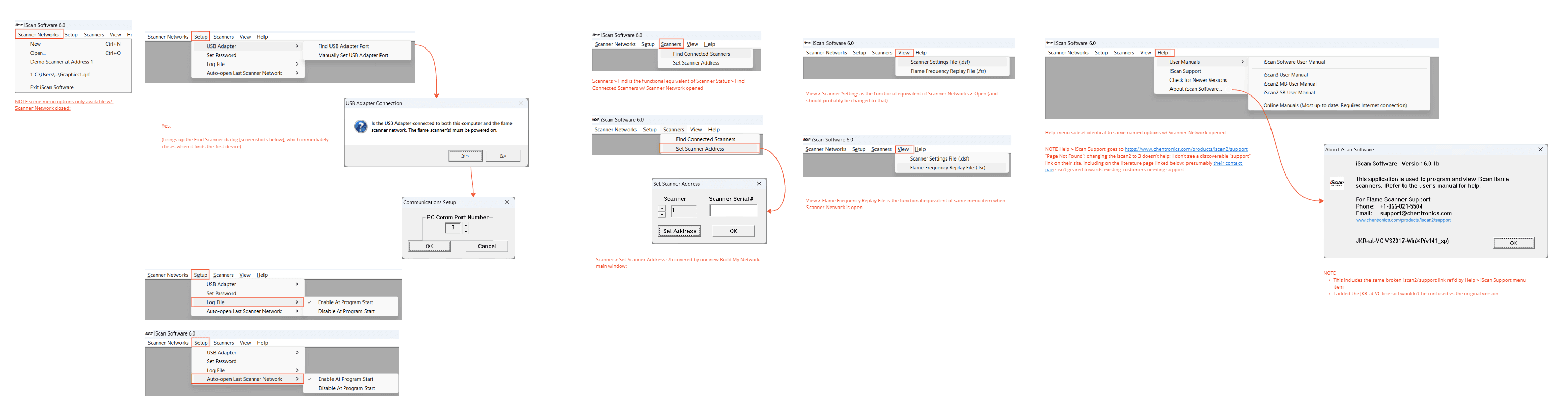
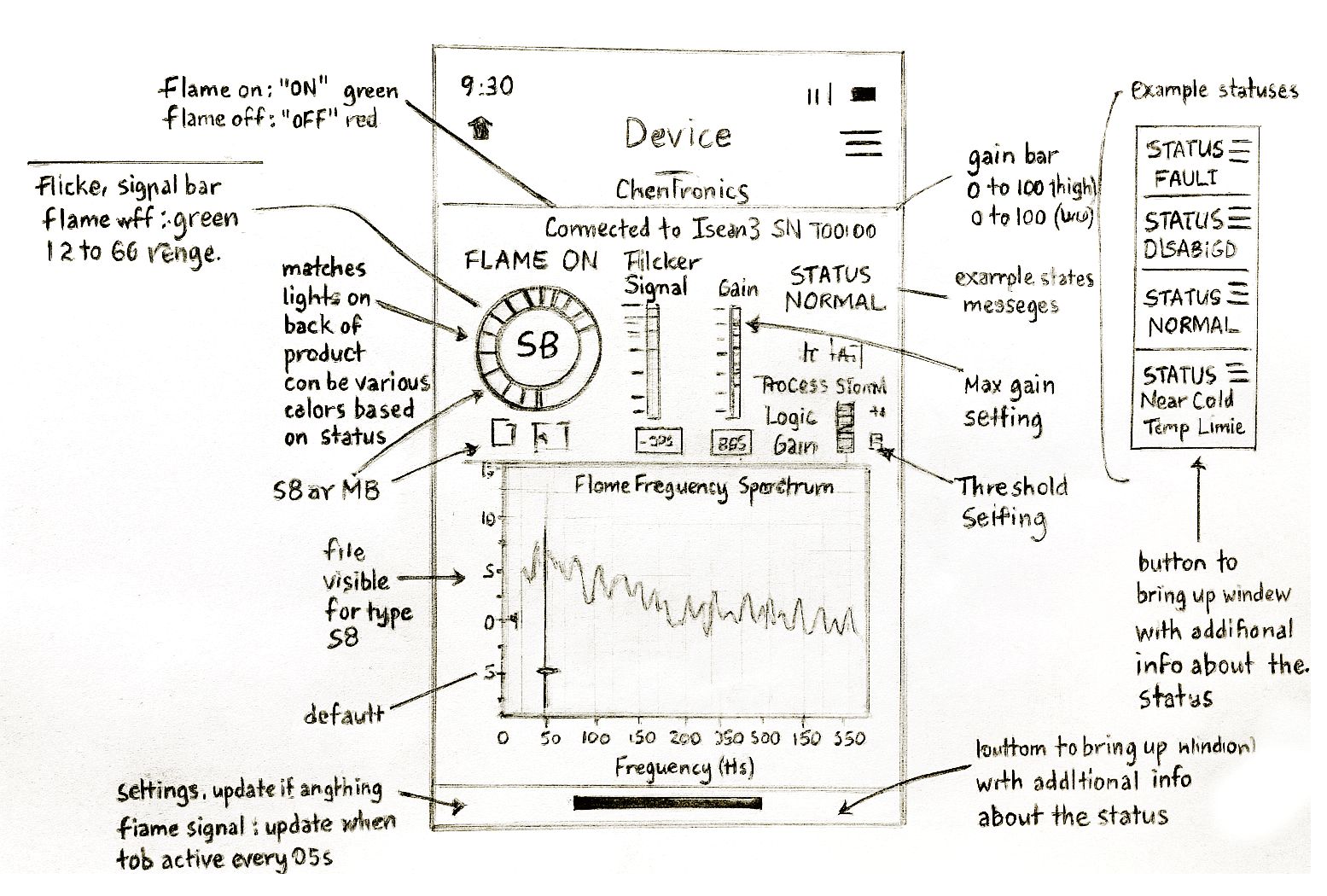
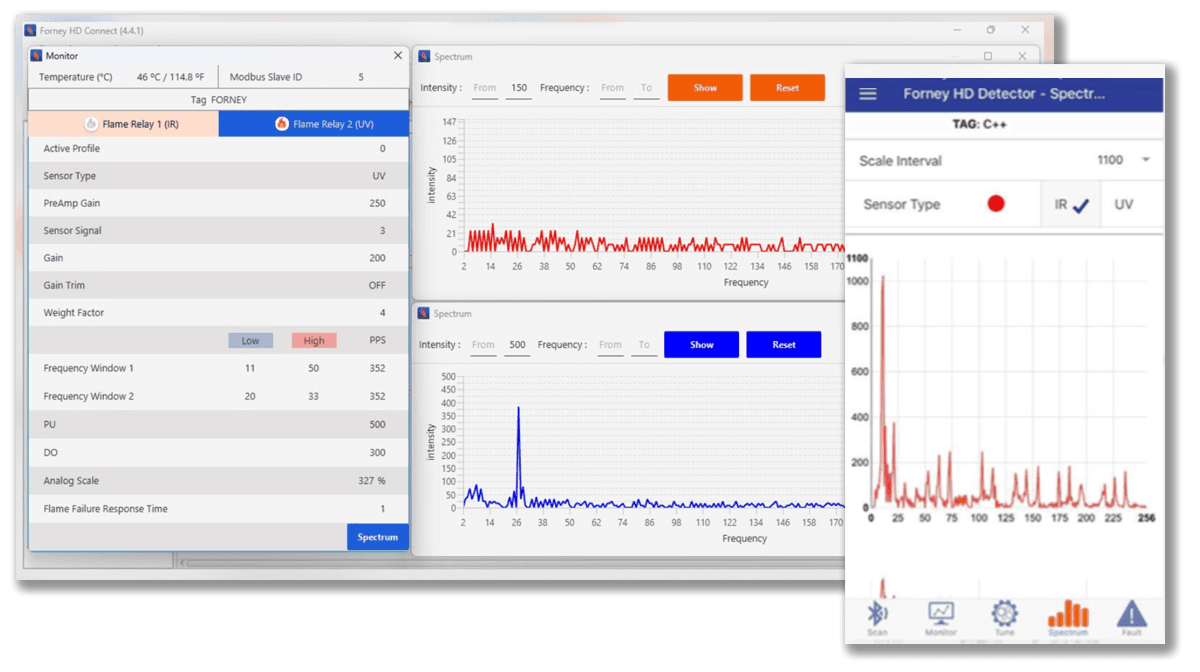
Existing Desktop Tool — Forney HD Connect, the software technicians were working around

STAKEHOLDER INQUIRY

What field technicians actually told us.

Research started in the field — with technicians using the iScan 3+ under real working conditions. I led field observations and interviews, then synthesized findings into a clear brief for product and engineering. The mandate was explicit: the hardware was ahead of the software meant to support it.

Research started in the field — with technicians using the iScan 3+ under real working conditions. I led field observations and interviews, then synthesized findings into a clear brief for product and engineering. The mandate was explicit: the hardware was ahead of the software meant to support it.

"I'm checking flame sensors by feel and experience — there's no guided process."


Technicians were diagnosing complex industrial hardware using tacit knowledge built over years. There was no structured diagnostic flow — just manual checks, pattern recognition, and trial and error.

"I'm checking flame sensors by feel and experience — there's no guided process."


Technicians were diagnosing complex industrial hardware using tacit knowledge built over years. There was no structured diagnostic flow — just manual checks, pattern recognition, and trial and error.

"I'm checking flame sensors by feel and experience — there's no guided process."


Technicians were diagnosing complex industrial hardware using tacit knowledge built over years. There was no structured diagnostic flow — just manual checks, pattern recognition, and trial and error.

"Every device behaves differently. The app needs to know which one I'm looking at."


The iScan 3+ worked across a wide range of flame sensor models — each with different fault states, signal ranges, and diagnostic logic. A one-size-fits-all interface would give the wrong guidance every time.

"Every device behaves differently. The app needs to know which one I'm looking at."


The iScan 3+ worked across a wide range of flame sensor models — each with different fault states, signal ranges, and diagnostic logic. A one-size-fits-all interface would give the wrong guidance every time.

"Every device behaves differently. The app needs to know which one I'm looking at."


The iScan 3+ worked across a wide range of flame sensor models — each with different fault states, signal ranges, and diagnostic logic. A one-size-fits-all interface would give the wrong guidance every time.

"I'm working in the dark on unfamiliar equipment in bad conditions."


Field conditions were frequently difficult — poor lighting, confined spaces, time pressure, unfamiliar installations. The app had to work as a real-time guide, not a reference document the technician read before going in.

"I'm working in the dark on unfamiliar equipment in bad conditions."


Field conditions were frequently difficult — poor lighting, confined spaces, time pressure, unfamiliar installations. The app had to work as a real-time guide, not a reference document the technician read before going in.

"I'm working in the dark on unfamiliar equipment in bad conditions."


Field conditions were frequently difficult — poor lighting, confined spaces, time pressure, unfamiliar installations. The app had to work as a real-time guide, not a reference document the technician read before going in.

KEY FINDING

The hardware signal needed to drive the diagnostic experience — not the other way around.

The most important research finding wasn't about the interface — it was about the relationship between the physical device and the software meant to interpret it. I brought it to product and engineering before any architecture decisions were made: the iScan 3+ was generating rich signal data, none of it being translated into guided action at the point of diagnosis. That single finding drove every architecture decision that followed.

The most important research finding wasn't about the interface — it was about the relationship between the physical device and the software meant to interpret it. I brought it to product and engineering before any architecture decisions were made: the iScan 3+ was generating rich signal data, none of it being translated into guided action at the point of diagnosis. That single finding drove every architecture decision that followed.

CORE TENSION

Field simplicity vs hardware complexity — two needs the design couldn't trade off against each other.

The hardware was complex. The field conditions were demanding. The technician needed simplicity. I ran a working session with product and engineering to make the tradeoff explicit — engineering needed the full diagnostic signal, technicians needed it invisible. The design had to hold all three simultaneously.

The hardware was complex. The field conditions were demanding. The technician needed simplicity. I ran a working session with product and engineering to make the tradeoff explicit — engineering needed the full diagnostic signal, technicians needed it invisible. The design had to hold all three simultaneously.

FIELD TECHNICIANS WANTED

Simple guided steps on a phone

  • Works in bad conditions

  • Fast fault identification

ENGINEERING NEEDED

Full fault-state taxonomy surfaced

Full fault-state taxonomy surfaced

  • Real sensor signal data

  • Cross-platform .NET architecture

DESIGN RESOLVED

Hardware-aware guided flow

Hardware-aware guided flow

  • Fault-state taxonomy as UX logic

  • Mobile-first, desktop-ready

The Resolution

The technician sees a clean, guided diagnostic flow. The system is reading device type, signal data, and fault state in real time. Simplicity on the surface. Full hardware complexity underneath.

The Resolution

The technician sees a clean, guided diagnostic flow. The system is reading device type, signal data, and fault state in real time. Simplicity on the surface. Full hardware complexity underneath.

DESIGN DECISIONS

Every decision traced back to a finding.

Five distinct design choices — each one a direct response to something we heard in the field.

Five distinct design choices — each one a direct response to something we heard in the field.

Five distinct design choices — each one a direct response to something we heard in the field.

DECISION 1

Hardware-aware guided flow — the app identifies the device before it gives any guidance.
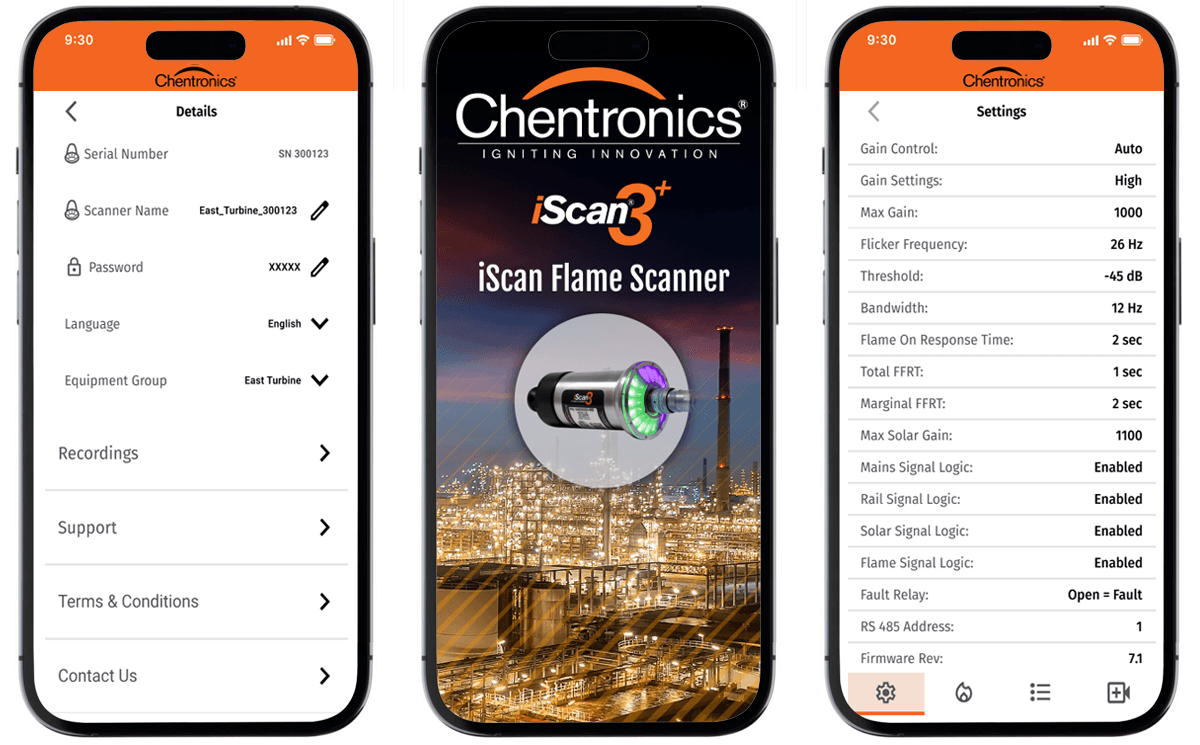
Device Identification — Hardware Type and Serial Number Surfaced at First Interaction

Device Identification — Hardware Type and Serial Number Surfaced at First Interaction

FINDING

Every flame sensor model had different fault states and signal ranges. Generic guidance wasn't just unhelpful — it sent technicians down the wrong diagnostic path.

INSIGHT

The diagnostic flow couldn't start until the app knew exactly which device it was talking to. I brought this to product and engineering as a foundational architecture requirement before any screens were designed.

DESIGN

Device identification built into the first interaction — hardware type, fault states, signal thresholds, and diagnostic steps loaded automatically. Nothing generic, nothing that could apply to the wrong sensor.

DECISION 2

Fault-state taxonomy as UX logic — turning engineering signal data into guided steps.
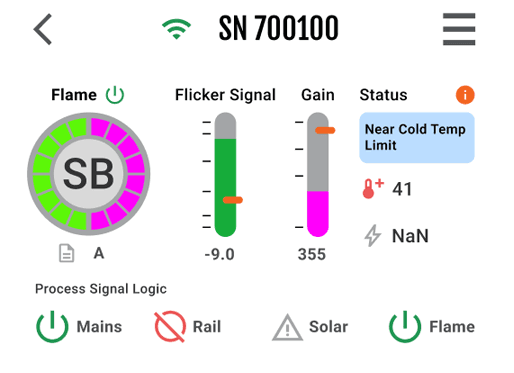
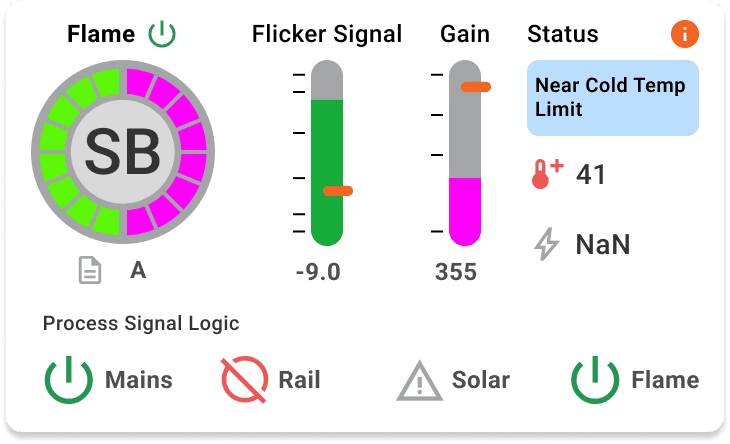
Fault State Surfaced as Plain-Language Guidance

Fault State Surfaced as Plain-Language Guidance

FINDING

The iScan 3+ was generating complex fault signal data that technicians couldn't interpret without deep product knowledge. The signal existed. The translation didn't.

INSIGHT

The fault-state taxonomy wasn't an engineering reference — it was the content architecture for the entire diagnostic experience. I mapped every fault state to plain-language guidance before any screens were designed.

DESIGN

Every fault state surfaces as a plain-language action, not a raw error code. The technician gets exactly what to do next — not a number to look up.

DECISION 3

.NET MAUI — mobile-first architecture designed to scale to desktop.
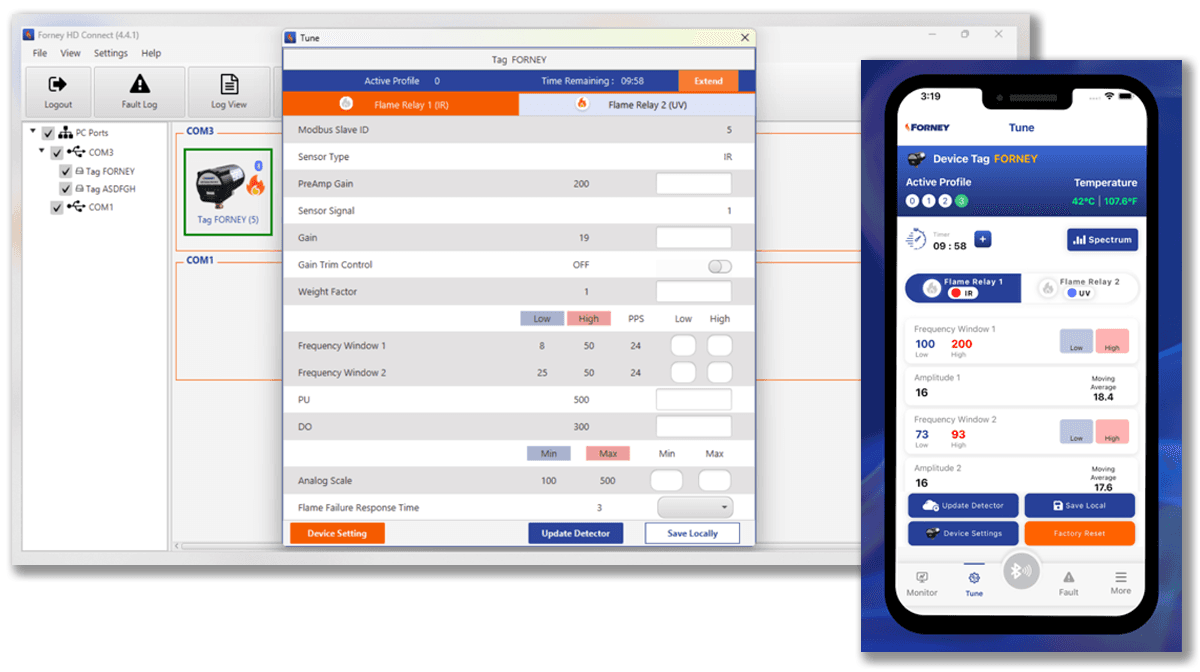
Mobile-First, Desktop-Ready — Full Device Spectrum Supported

Mobile-First, Desktop-Ready — Full Device Spectrum Supported

FINDING

Field technicians needed a phone-based experience. Engineering needed an architecture that could grow into desktop workflows as the product expanded.

INSIGHT

The platform choice wasn't a technical decision — it was a product strategy decision. React Native on a .NET backend was the only choice that could be mobile-first today and desktop-ready tomorrow without a rebuild.

DESIGN

React Native front end on a .NET backend — mobile-first, cross-platform, architected for future desktop expansion. Every component built with the full device spectrum in mind, not just the current phone use case.

DECISION 4

Designed for the full device spectrum — not just the most common sensor.
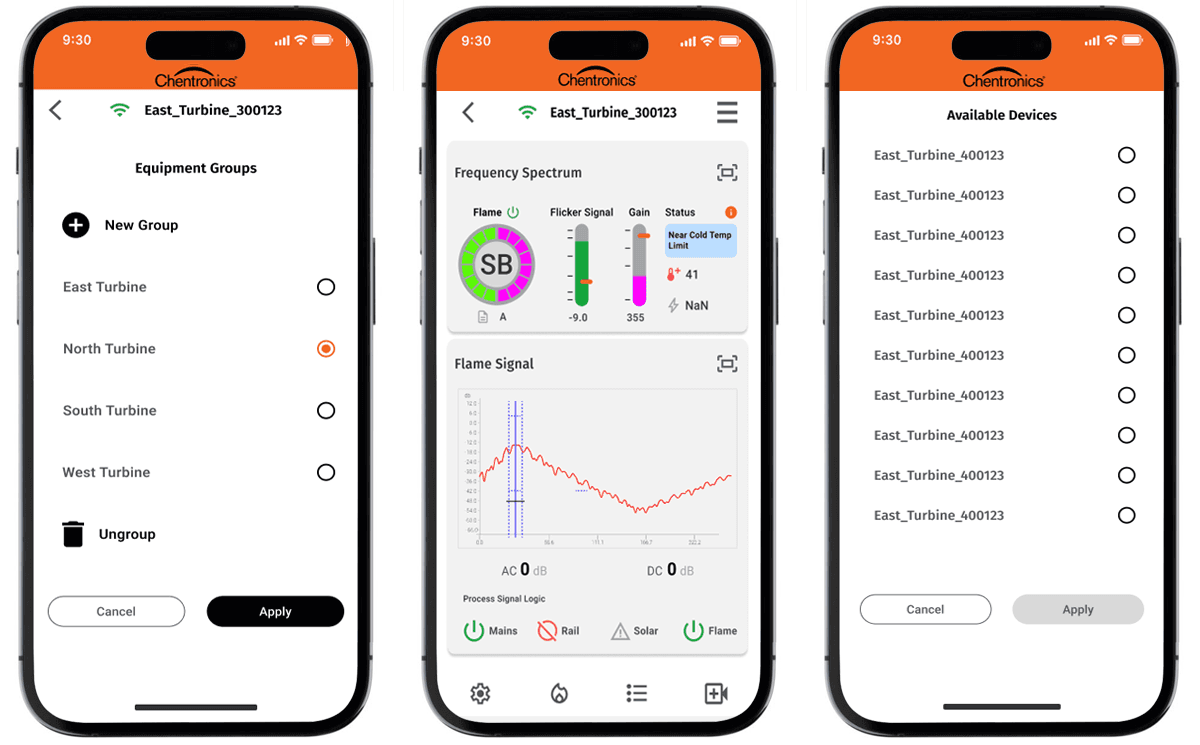
Full Device Spectrum — Equipment Groups, Live Diagnostics, and Device Discovery

Full Device Spectrum — Equipment Groups, Live Diagnostics, and Device Discovery

FINDING

Technicians worked across a wide range of flame sensor models and installation types. An app designed around the most common scenario would fail everyone working with anything else.

INSIGHT

Edge cases in industrial diagnostics aren't edge cases — they're the actual job. I brought this framing to product before the IA was finalized.

DESIGN

Every sensor type, fault state, and signal range accounted for in the guidance system from day one. Spec assumptions validated against actual iScan 3+ hardware behavior before build completed.

DECISION 5

Prototype validated against real hardware — sensor signal as the source of truth.
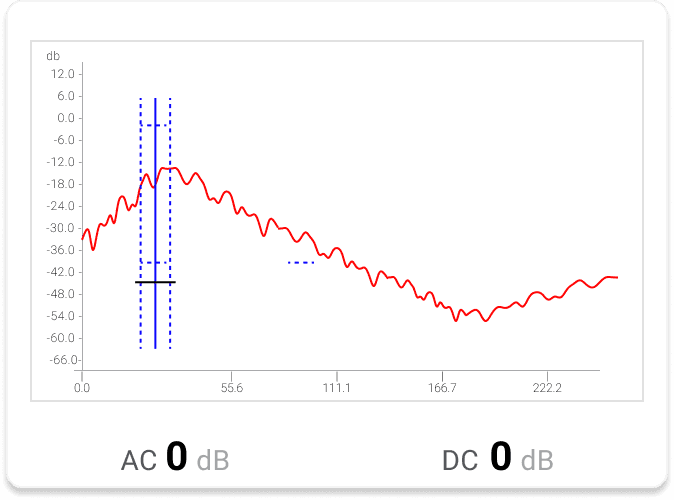
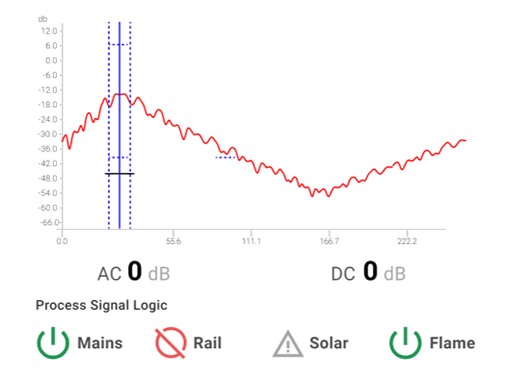
Live Hardware Signal — Frequency Spectrum from the iScan 3+

Live Hardware Signal — Frequency Spectrum from the iScan 3+

FINDING

Field conditions — poor lighting, confined spaces, time pressure — meant a prototype that looked right on a desk could completely fail in a real diagnostic situation.

INSIGHT

Validation against the actual hardware signal was the only test that mattered. I pushed for prototype testing against the iScan 3+ itself before any build began.

DESIGN

Every guided repair flow tested against live hardware signal — how and where the signal was actually used, not where it was assumed to be. The sensor was the source of truth throughout.

PROCESS

Five phases — from hardware audit to live prototype validation. Research drove architecture. Architecture drove every screen.

1

Field Workflow & Hardware Audit

Observed technicians diagnosing in the field — mapping friction points, failure moments, and the manual workarounds the app had to replace.

2

Fault-State Modeling & Signal Mapping

Collaborated with firmware engineers to translate raw sensor data into a shared fault taxonomy — every UI state mapped to a real hardware condition.

3

Diagnostic Flow Architecture

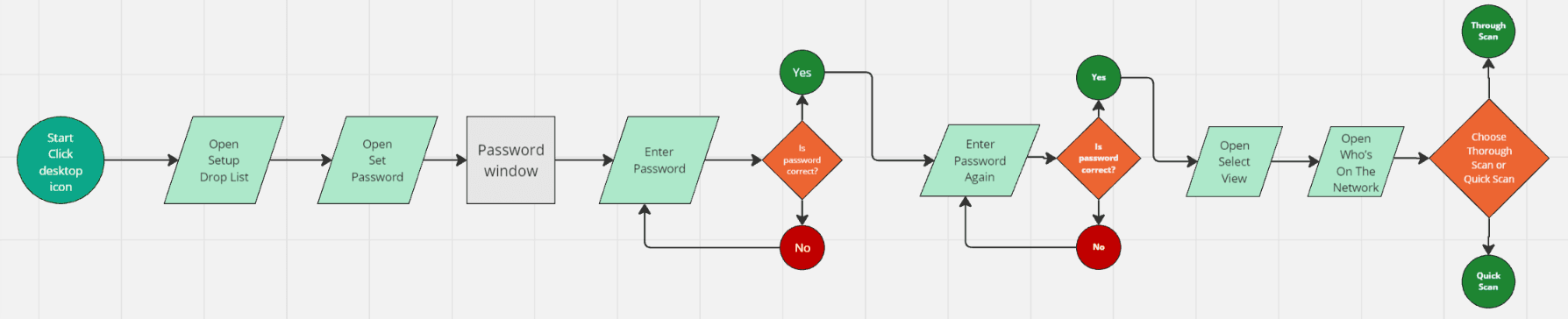
Designed structured troubleshooting paths that surfaced root causes and real-time sensor feedback at every decision point — no ambiguity in the field.

4

UI Design & Interaction Patterns

Built for glanceability under industrial conditions — sensor health hierarchy, color-coded states, 8pt grid, component state matrices, and mobile breakpoint specs across the full device inventory.

5

Hardware-Integrated Prototype Validation

Ran task-based usability sessions with technicians using prototypes connected to real iScan® 3+ hardware signals — findings drove final iteration before build.

DESIGN SYSTEM

Brand and fault-state colors were kept separate from day one. Each had a different job.

Chentronics' primary brand color is orange — which directly conflicts with warning and alert states if used at full saturation. Tinted versions of the brand palette created enough separation so orange could still function as a brand signal without being read as a hardware fault. Alert states — green, magenta, blue, yellow, red — mapped to real hardware conditions and stayed visually distinct from brand at every usage level.
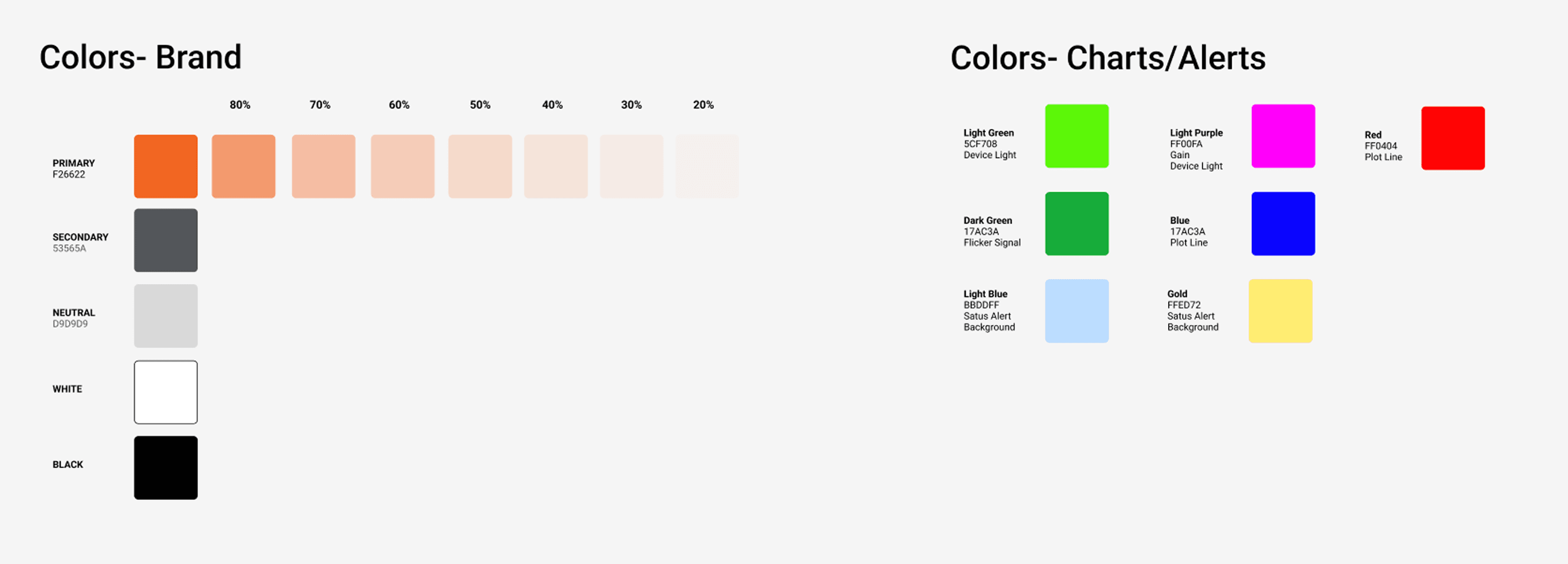
Fault-State Color System — Brand and Alert States Mapped to Hardware Conditions

Fault-State Color System — Brand and Alert States Mapped to Hardware Conditions

FIELD-CONDITIONS DESIGN CONSTRAINTS

Designed for how and where the app actually gets used
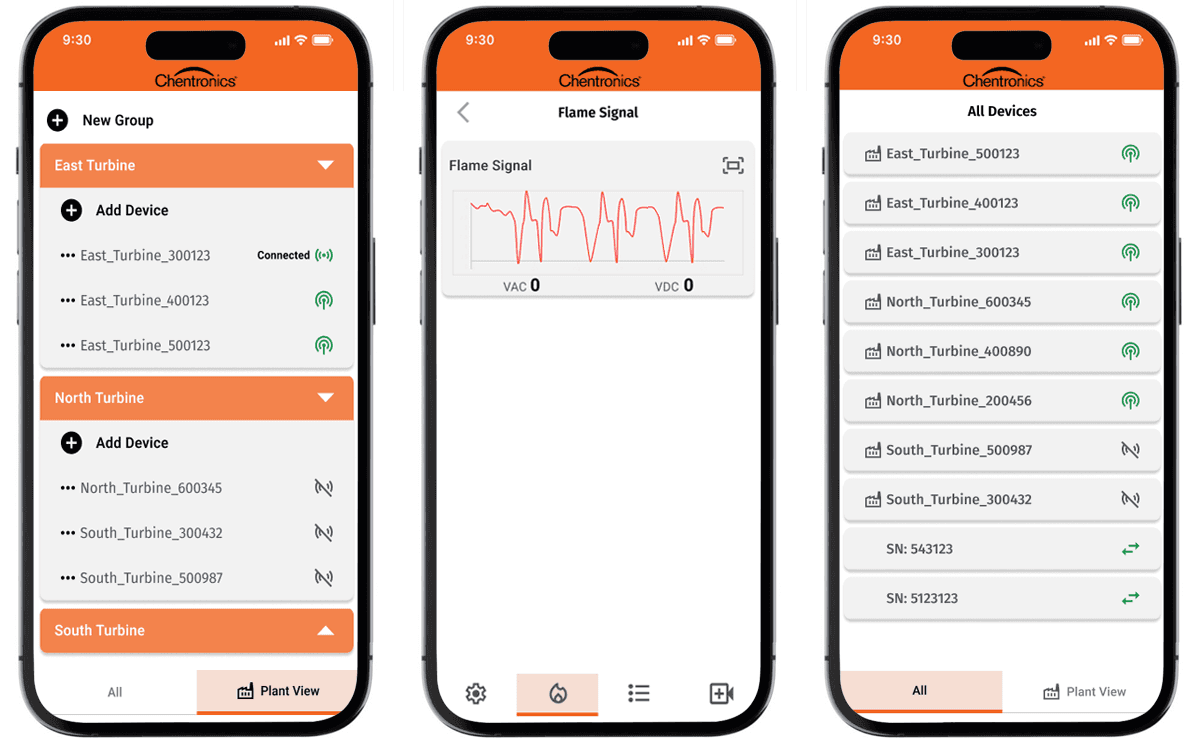
.NET MAUI's codebase had to hold across iOS, Android, and varied screen sizes, so every component was specified smallest screen first, then validated on real devices. Tap targets, contrast states, and navigation patterns were designed for gloves, outdoor lighting, and single-hand use. The field environment shaped every layout decision — not the ideal conditions of a desk and a bright monitor.

.NET MAUI's codebase had to hold across iOS, Android, and varied screen sizes, so every component was specified smallest screen first, then validated on real devices. Tap targets, contrast states, and navigation patterns were designed for gloves, outdoor lighting, and single-hand use. The field environment shaped every layout decision — not the ideal conditions of a desk and a bright monitor.

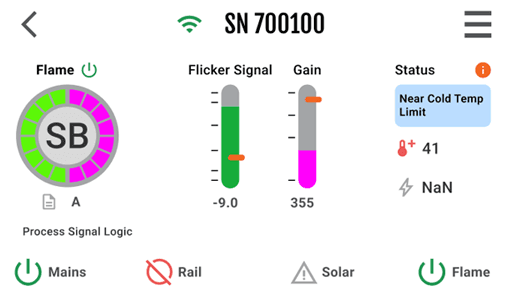
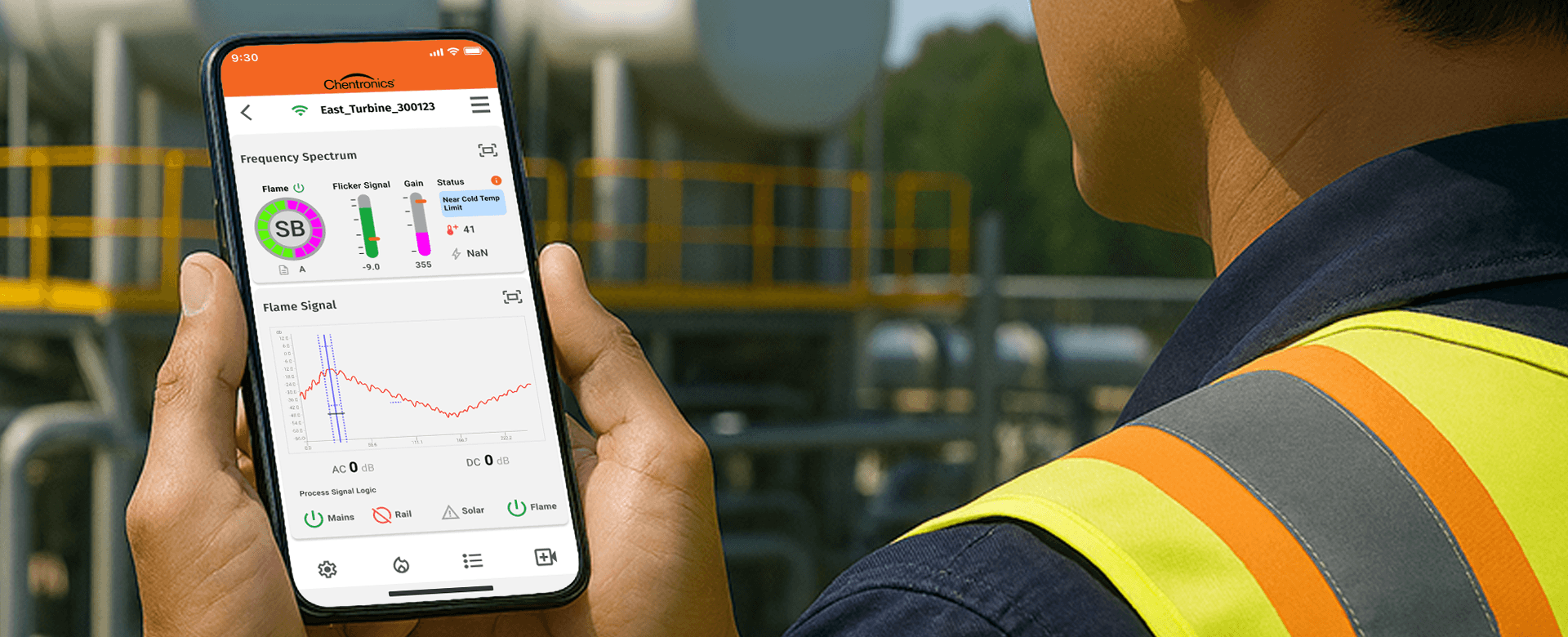
Mobile-First Layout — Plant View, Signal Display, and Device List

Mobile-First Layout — Plant View, Signal Display, and Device List

PROTOTYPE

From sensor signal to guided repair validated against real hardware, built to run on more than one surface.

Built in .NET MAUI, I designed the complete technician journey end-to-end — device discovery, real-time sensor health visualization, fault-state identification, guided troubleshooting steps, and repair confirmation. Validated against real iScan® 3+ hardware signals before build completed. The same architecture that runs this mobile experience will power the desktop version when it ships.

Built in .NET MAUI, I designed the complete technician journey end-to-end — device discovery, real-time sensor health visualization, fault-state identification, guided troubleshooting steps, and repair confirmation. Validated against real iScan® 3+ hardware signals before build completed. The same architecture that runs this mobile experience will power the desktop version when it ships.

Available now directly from Chentronics download at:

chentronics.com/solutions/iscan3.


Not yet on the Apple App Store or Google Play — coming soon.
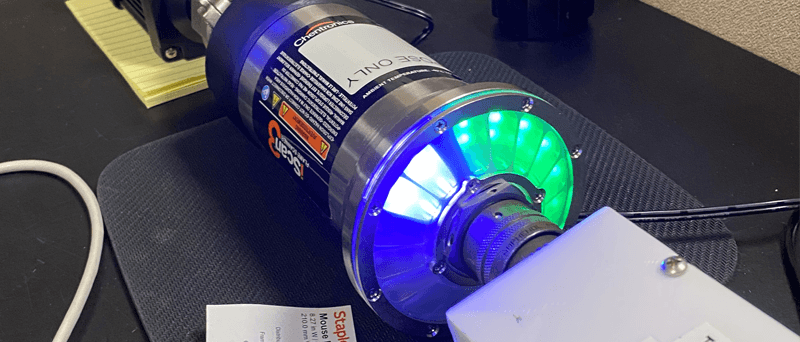
The iScan® 3+ — the device the app was built around.

The iScan® 3+ — the device the app was built around.

"Testing against real hardware signals — not simulated data — is what made the difference between a prototype that looked right and one that actually worked. Designing within a .NET-backed architecture meant there were no surprises when it came time to connect the UI to the data."

"Testing against real hardware signals — not simulated data — is what made the difference between a prototype that looked right and one that actually worked. Designing within a .NET-backed architecture meant there were no surprises when it came time to connect the UI to the data."

OUTCOMES

A scalable diagnostic framework built for cross-platform growth and faster fault resolution in the field.

First mobile app for Chentronics

The iScan® 3+ diagnostic app is Chentronics' first mobile product a new channel for field support built from the ground up.

Reduced technician guesswork

Guided troubleshooting flows replaced manual cross-referencing with clear, step-by-step repair paths anchored to real hardware signal data.

Visibility into sensor health and modes

Technicians could immediately understand device state without consulting hardware manuals — fault state surfaced as plain-language action.

A cross-platform foundation established

The same .NET MAUI UI layer, the same backend — ready to serve a desktop surface when the roadmap calls for it, without a rebuild.

PROJECT GALLERY

From hardware signal research to shipped diagnostic app
Competitive Analysis

Competitive Analysis

Signal Visualization Research

Signal Visualization Research

Information Architecture

Information Architecture

Technician Workflows

Technician Workflows

Sensor Configuration

Sensor Configuration

Visual Identity

Visual Identity

Data Visualization

Data Visualization

Wireframes

Wireframes

Data Visualization

Data Visualization

Final Designs

Final Designs

Final Designs

Final Designs

Final Designs

Final Designs

What I'd do differently

Get hardware test rigs in front of the team earlier. The most valuable feedback came from testing against real sensor signals, but that happened late in the process. Starting desktop layout exploration in parallel with mobile would have validated the component model against both surfaces before mobile decisions were locked in.

Get hardware test rigs in front of the team earlier. The most valuable feedback came from testing against real sensor signals, but that happened late in the process. Starting desktop layout exploration in parallel with mobile would have validated the component model against both surfaces before mobile decisions were locked in.