AI PROJECTS / Roadrunner HR CRM

Roadrunner CRM Solo Project
Closing the design-to-code loop end to end.

TWO PROBLEMS

Watched for years from the design side, and one product built to solve both.

Design and code never matched: Figma handed off, engineering rebuilt it close enough, and the tokens drifted apart within sprints. Every CRM I shipped had the second problem, dirty data: duplicate records, stale contacts, sources nobody could trace.

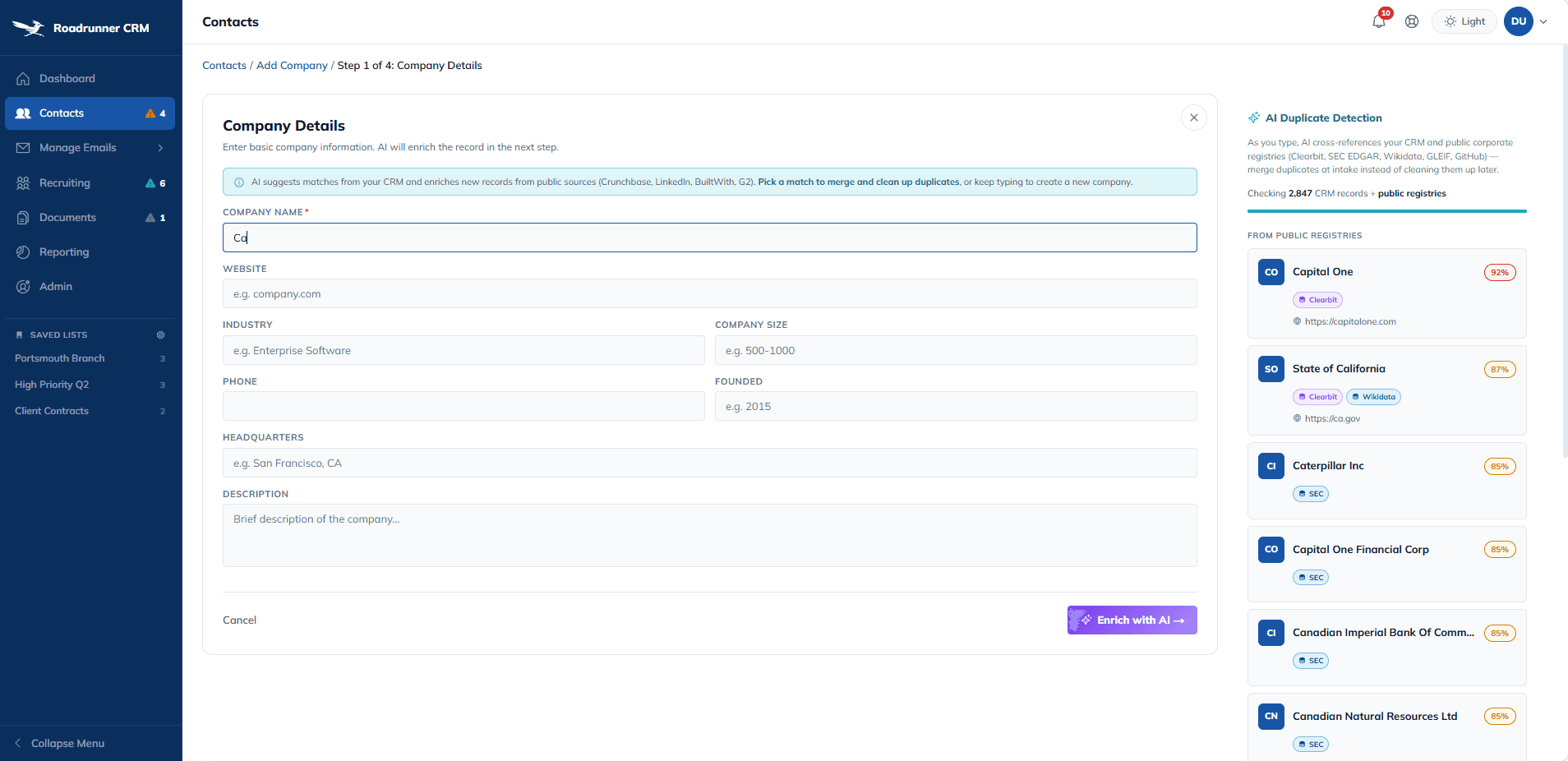
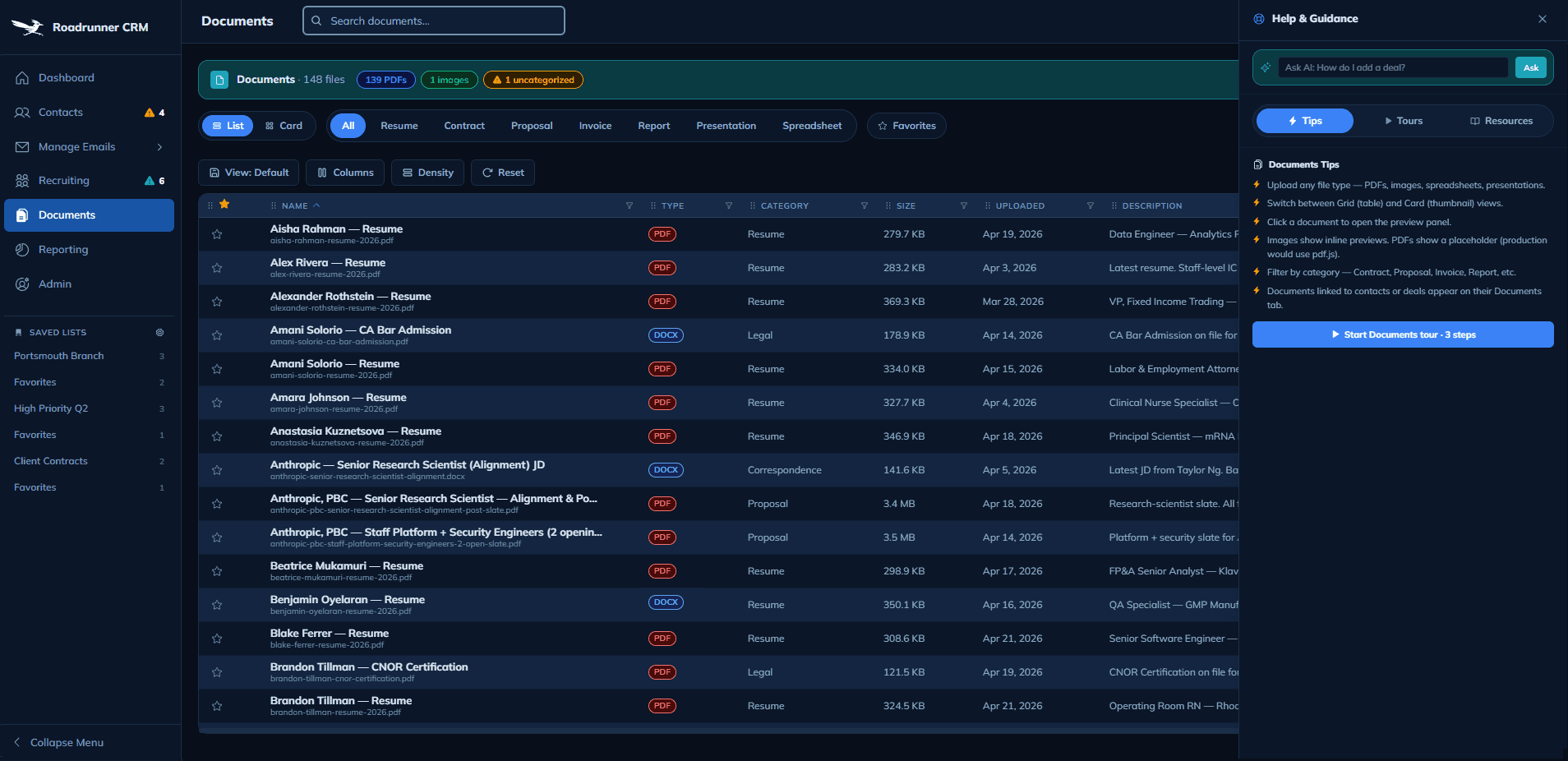
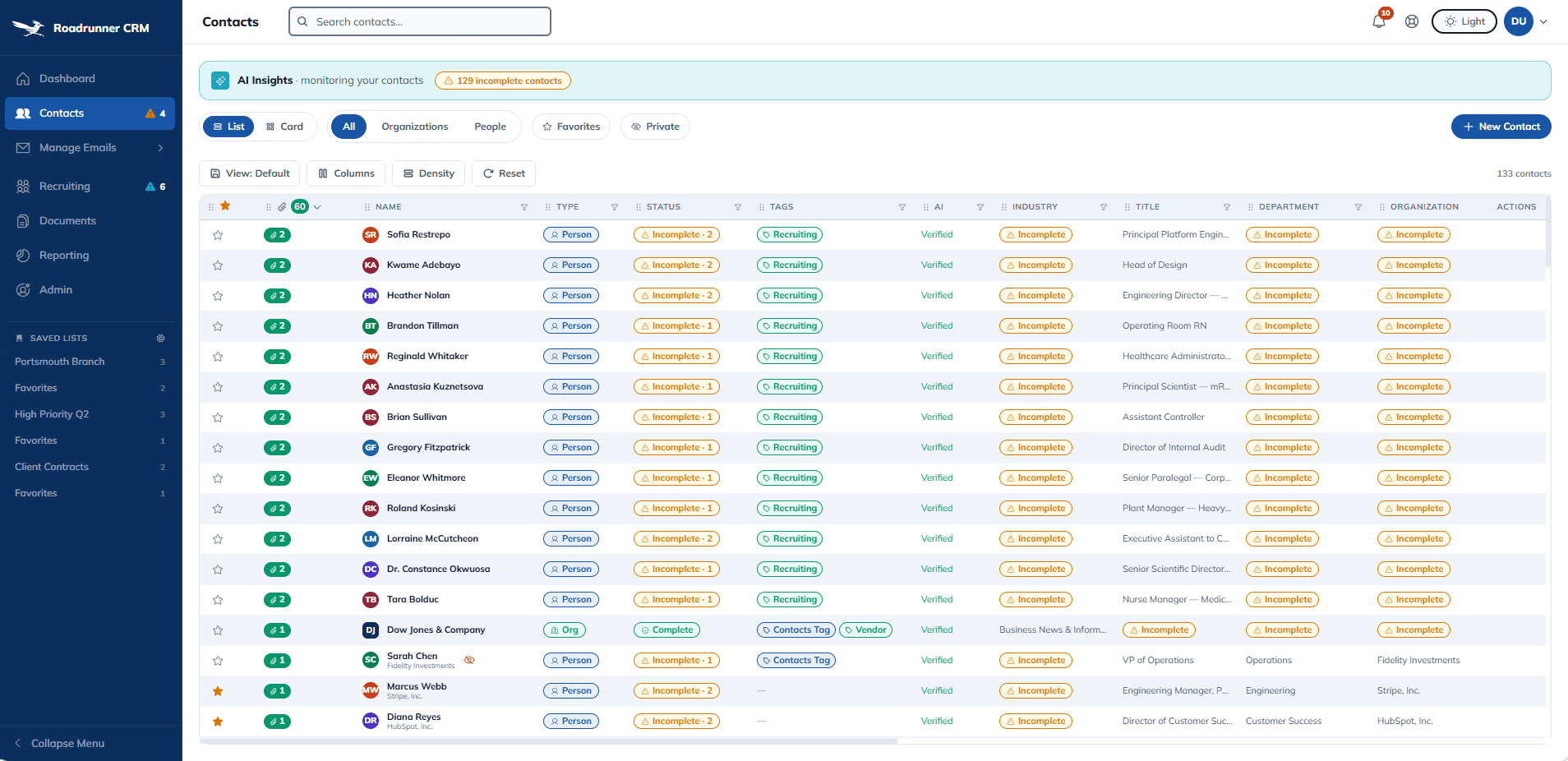
The design-to-code loop closed with Acme tokens and Figma MCP, and real AI suggestions went onto every intake surface: duplicate detection, auto-populate from eleven public sources, attribution per field. Record creation went from minutes to seconds. This is not a Figma prototype. It is a live working product. AI fires against real APIs. Any hiring manager can click through and try to break it.

Client / Self-initiated · built to sell on Etsy

Data + AI / 11 free public providers · free-tier AI · zero paid APIs

Role / Product design · front-end build · deploy

Timeline / 3 days Acme · 5 days Roadrunner v1 · 1 day polish

Scope / Working CRM · 8 modules · live

Stack / Figma MCP · Claude Code · Next.js 16 · TypeScript · Tailwind
AI Product Design

Design Systems

Front-End Development

Design-to-Code

CRM

MY ROLE

I designed the system, built the app, and shipped the loop myself.

WHAT I OWNED

The Acme design system: tokens, components, and seven handoff docs. Every Figma frame. Every line of TypeScript in the Next.js 16 build. Eleven public data integrations. Vercel deploy and custom DNS on paulwentzellux.com. This case study. One designer across the full stack of decisions and artifacts.

HOW I WORKED

Figma MCP read the design file. Claude Code generated code against the same tokens Figma used. The judgment seat stayed with me. Every grid pattern came from twelve years at Madison Resources CRM, Payfactors, and financial services platforms. Claude handled the generation, experience handled the decisions Claude couldn't make.

RESEARCH

Dirty data was the chronic problem and every HR team lives inside it.

Recruiters at Madison Resources spent hours every week reconciling duplicate candidate records, stale contact info, and fragmented source attribution. Comp analysts at Payfactors fought the same fight against outdated company data and records that said different things in different systems. Two industries with the same chronic failure mode.

Dirty data is the problem HR and comp professionals have asked for help with for as long as I've designed for them, and it is the exact problem Roadrunner's AI features are wired to solve.

When my first pass shipped a fake duplicate detector querying a hardcoded name pool and labeling the fake results "Clearbit verified," it was replicating the very problem I'd spent twelve years trying to fix.

WHAT USERS ASK FOR ON EVERY PROJECT - GRID EDITION

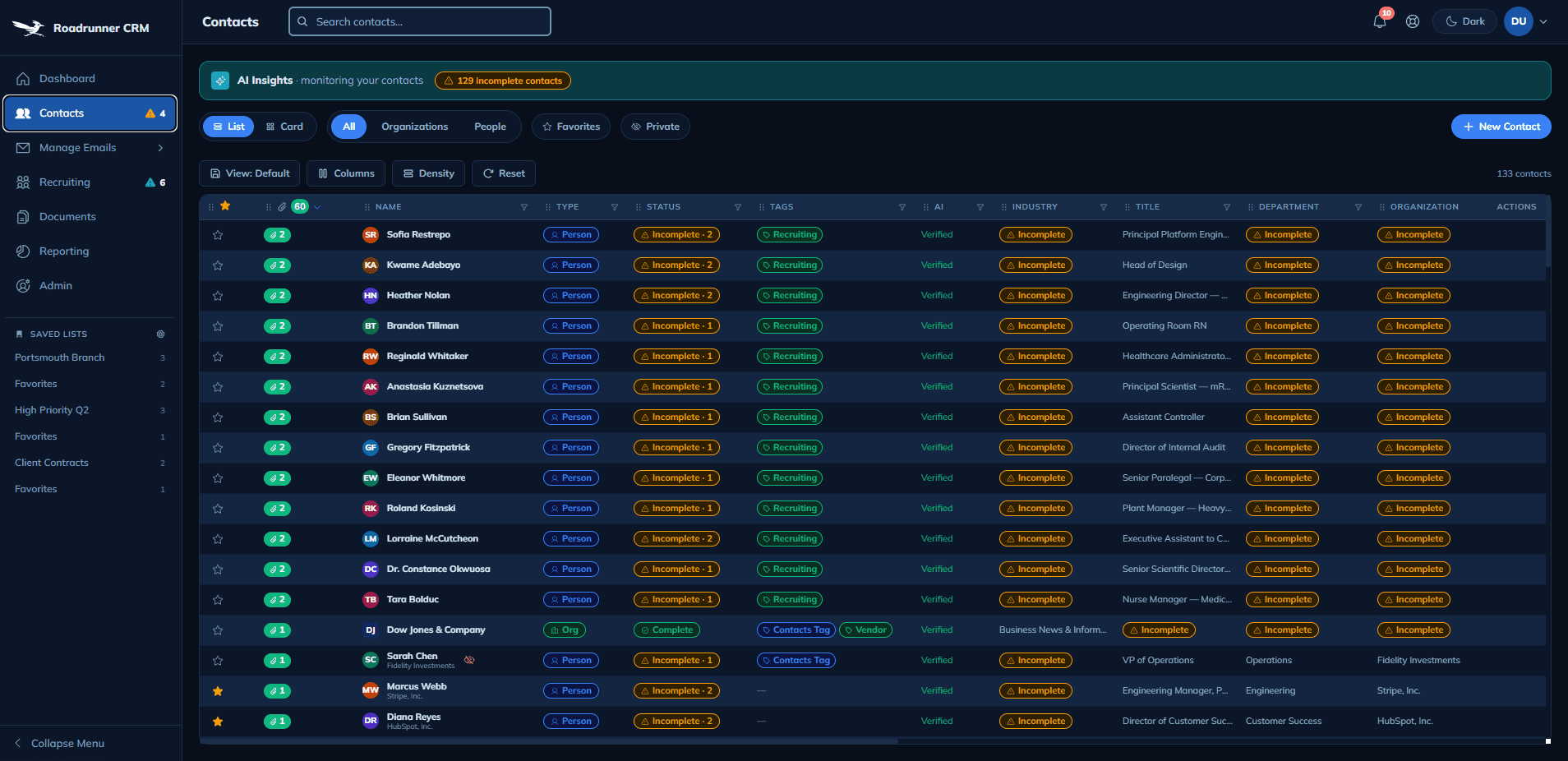
  • Saved views — "I want my layout back"

  • Column pinning — "keep Name visible when I scroll"

  • Density control — "let me fit more rows on screen"

  • Sticky row actions — "don't make me scroll to delete"

  • Per-column filters — "filter amount without leaving the grid"

WHAT USERS ASK FOR ON EVERY PROJECT - APP EDITION

  • Light and dark mode — every industry, every time

  • Help that's there when I need it, not just on install

  • Saved state that survives a refresh

  • Undo on anything destructive

Every grid in Roadrunner ships with all five grid patterns, and every app-level pattern ships too, because I've watched users at Madison Resources, Payfactors, and financial services platforms ask for them when they weren't there. Ten shipped patterns is pattern literacy earned in production.

KEY FINDING

Design and code were two separate translations of the same intent, and the gap between them is where drift lives.

On a normal project, a designer updates a color token in Figma. An engineer reads the hex, types it into a stylesheet, and maybe misreads it, or uses the old value because the variable was already defined. Every token is a handoff with a chance of loss. Multiply that by every component, every state, and every sprint, and that is where the gap lives.

THE CLOSE

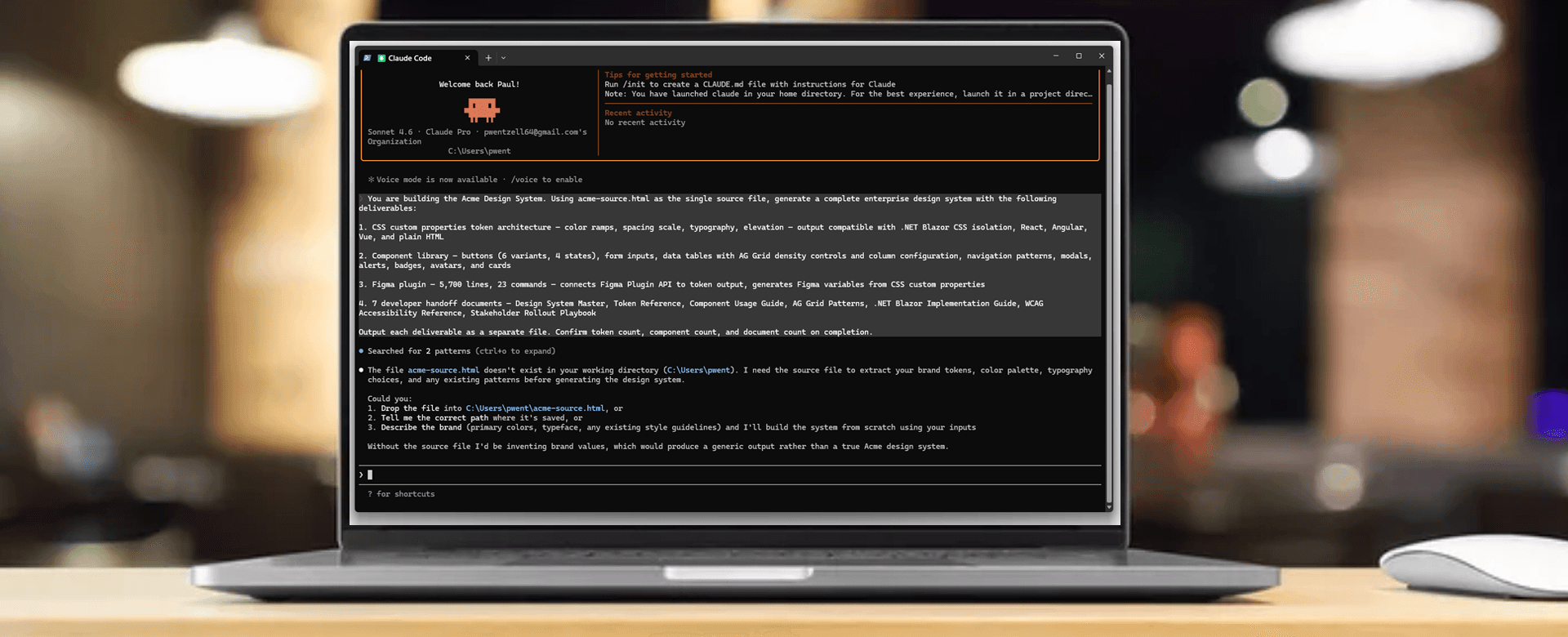
Acme tokens are defined once. Figma variables and Tailwind CSS custom properties reference the same values. Figma MCP reads the Figma file, and Claude Code generates React using Tailwind classes that resolve to those same tokens. A change in one surface shows up in the other without translation.

"Design and code stayed linked in both directions, the first time in twelve years a loop held on something I built."

DELIVERABLE: Token Library

A running token library engineering installs.

Acme tokens are defined once. Figma variables and Tailwind CSS custom properties reference the same source, so engineering installs, imports, and ships with no translation step and no drift.

When a token changes in Figma, the CSS variable updates, and every component using it retints. The loop holds in both directions.

TOKEN FILE - GLOBAL.CSS
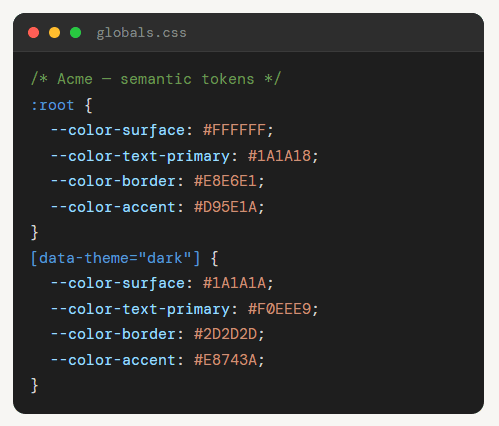
TOKEN FILE - GLOBAL.CSS
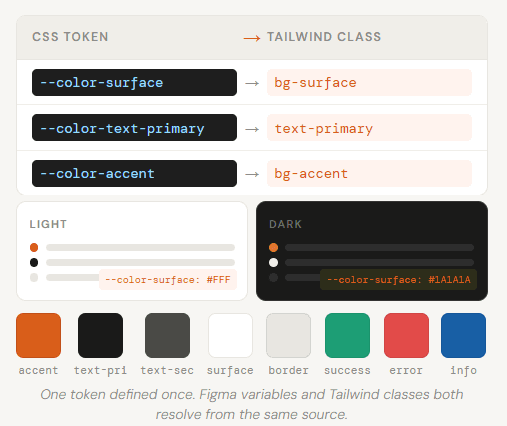
THE CORE TENSION

A system one designer can build fast still has to survive a real build.

A three-day design system sounds like a shortcut. On every enterprise project I've shipped, design systems built too fast broke the first time a real product demanded them. Acme had to prove it could power a working CRM, not just a portfolio screen.

THE AI LAYER

A central query pulse radiates out to all eleven providers, and each returns a result back to center. It repeats every 5 seconds.

One query. Eleven sources. Live.
QUERY"Tom Coffee"ClearbitGitHubWikidataSECGLEIFORCIDGravatarOpenCorpCos.HouseSAMHunter
One query fans out to eleven free public sources in parallel. Each returns independently. Source attribution is captured per field.

SIX WAYS TO EXPERIENCE THE APP

1

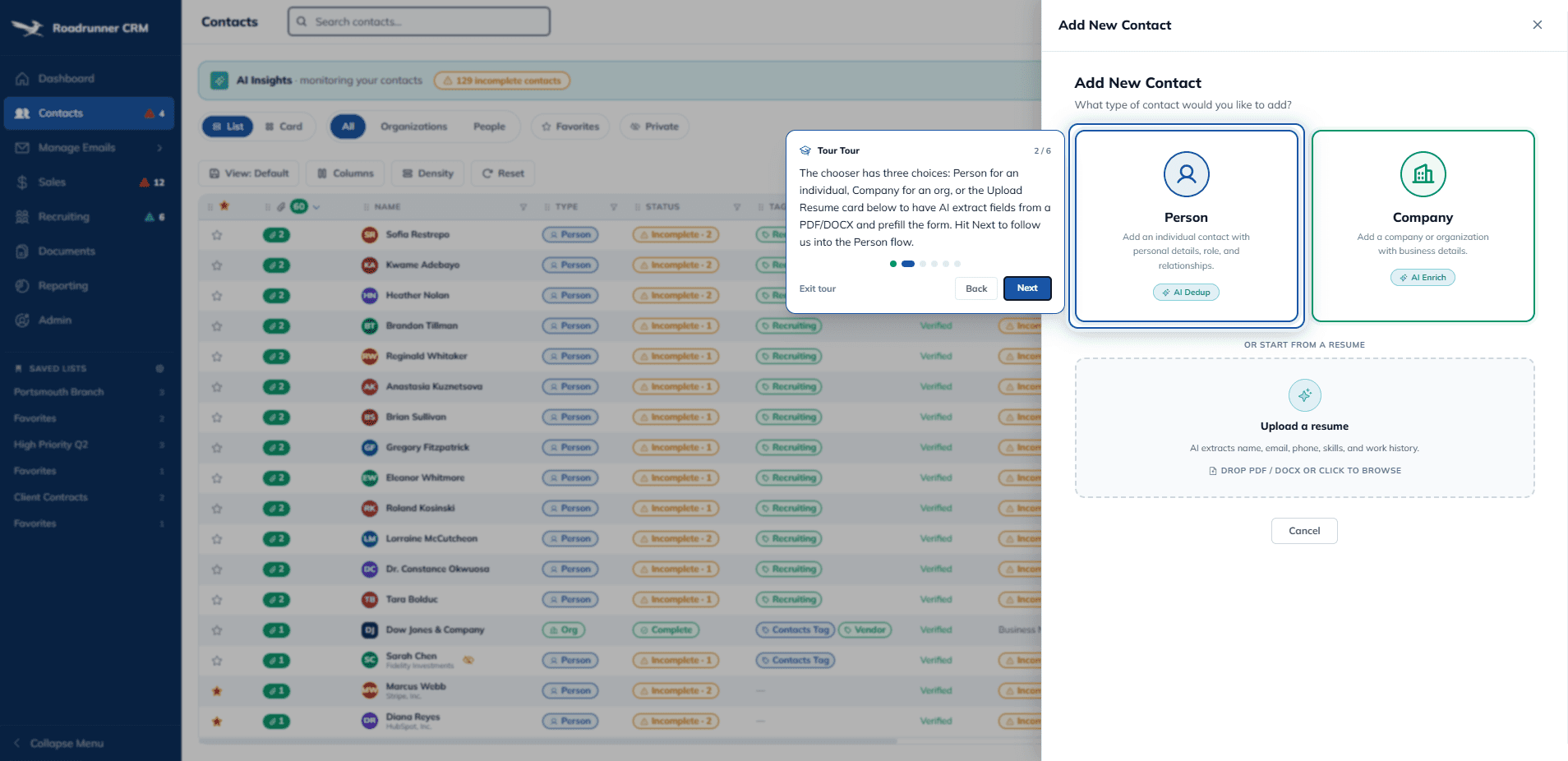
Create a new contact

Type a real name and watch duplicate detection run against public sources in real time, before you save.

2

Drop in a PDF or DOCX resume

The candidate intake parses it, prefills the form, and attaches the original to the contact's Documents tab.

3

Customize a grid

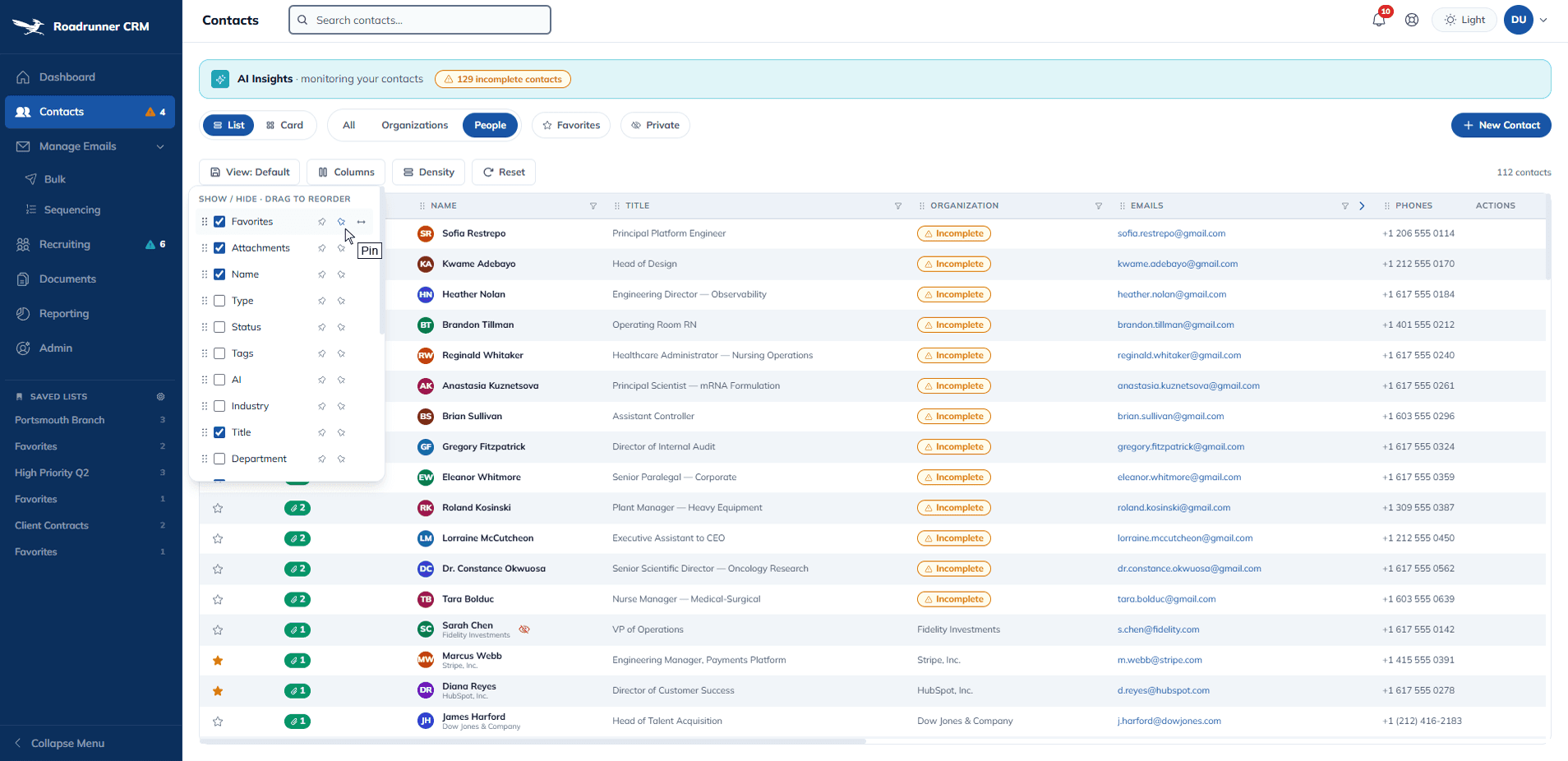
Open the Columns dropdown, pin a column, flip density. Refresh — your widths, pins, and density stay exactly as you left them.

4

Delete something and undo it

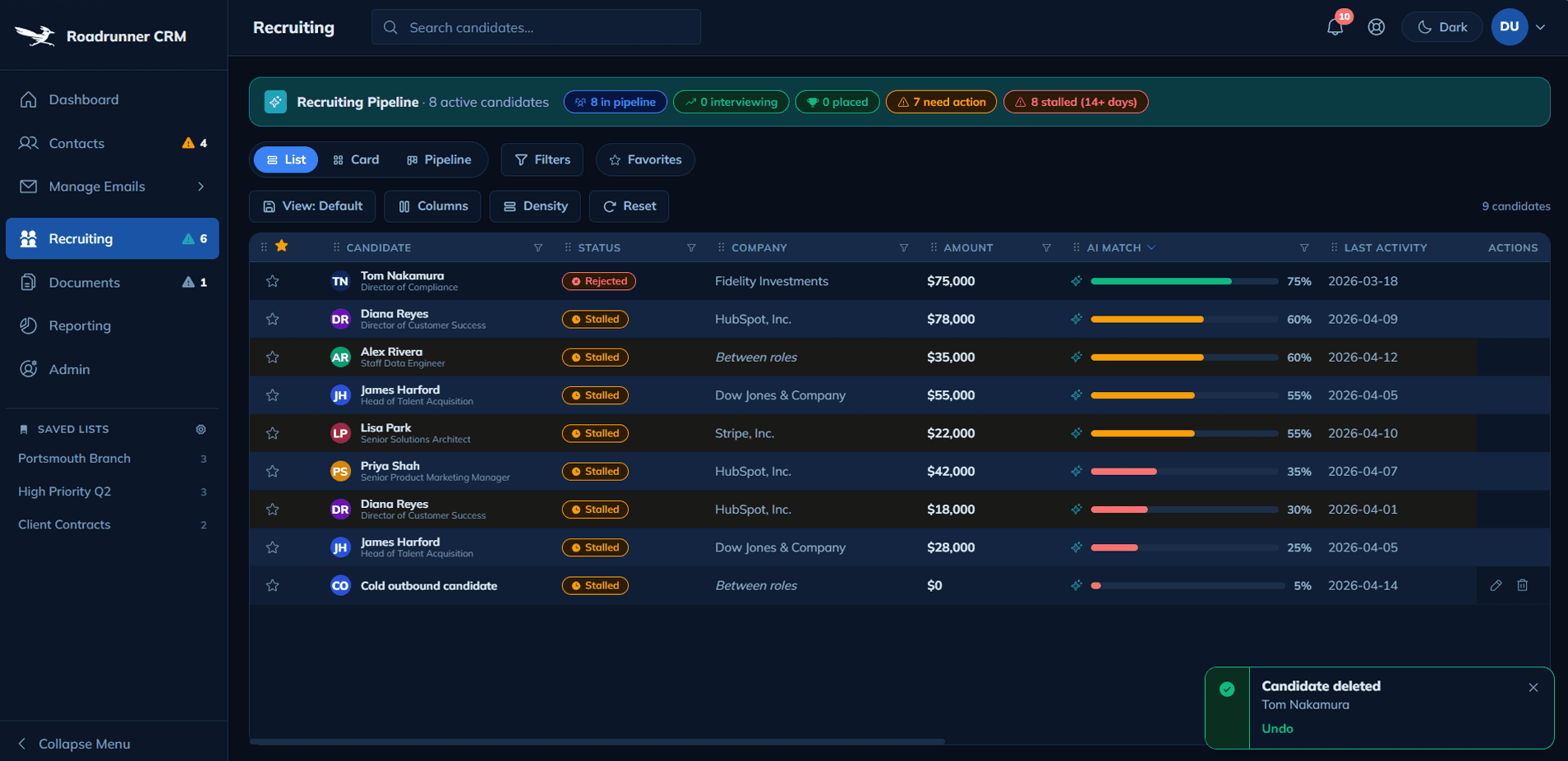
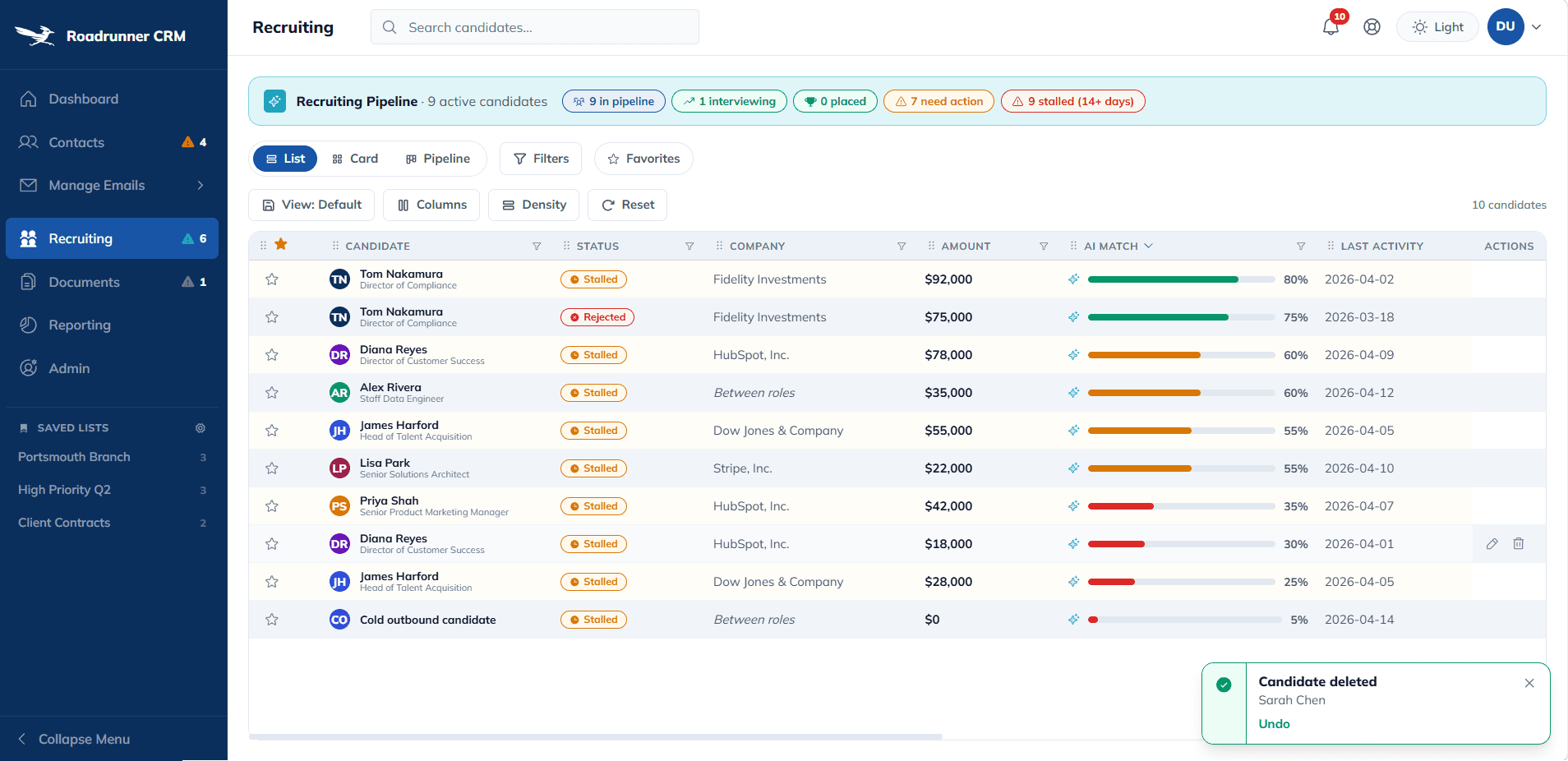
Every destructive action fires a toast with an Undo button. Click it and the record returns with every nested entry restored.

5

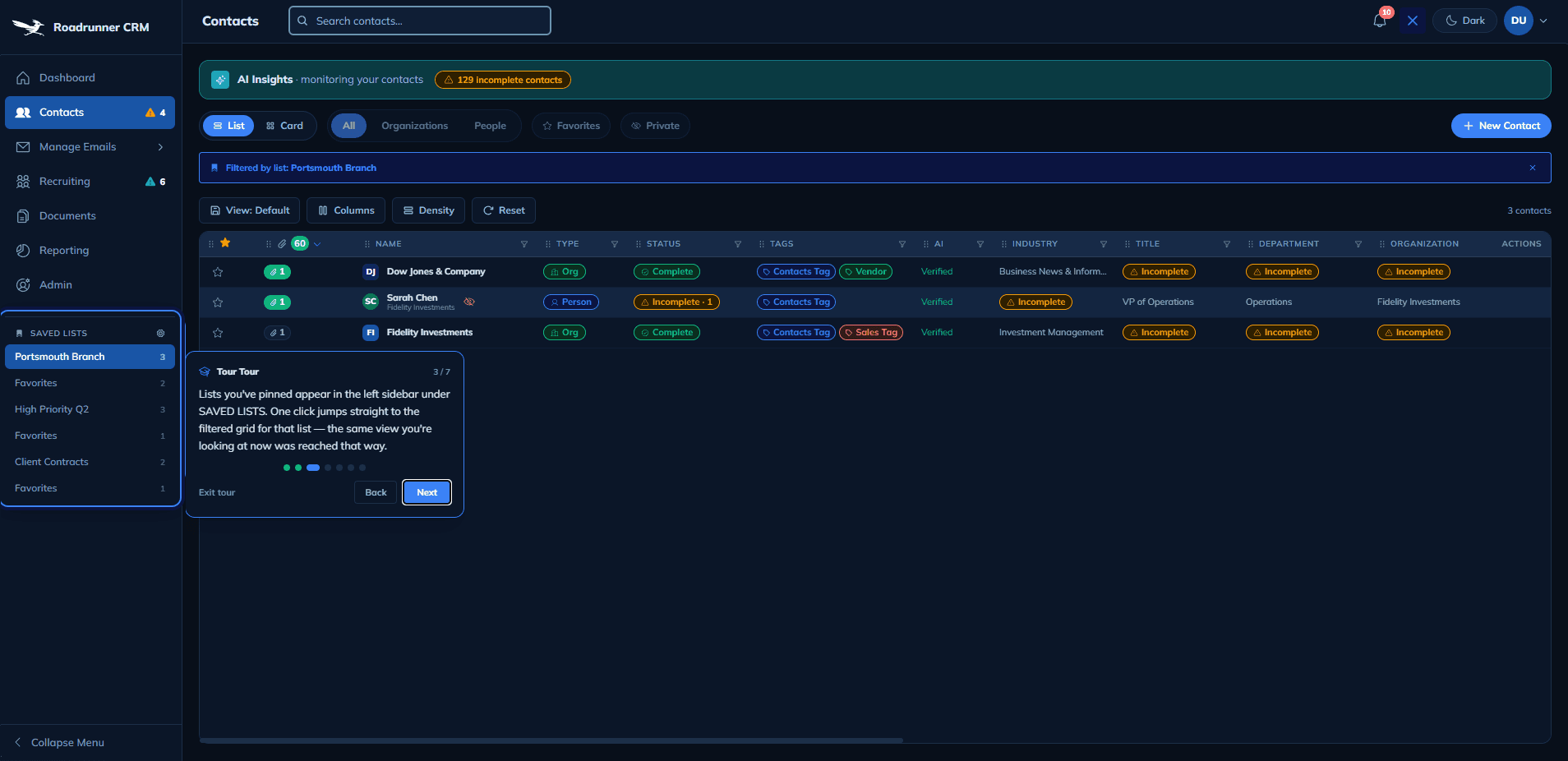
Take a guided tour

Help → Tours → pick any section. Contextual walkthroughs teach the shared patterns every module uses.

6

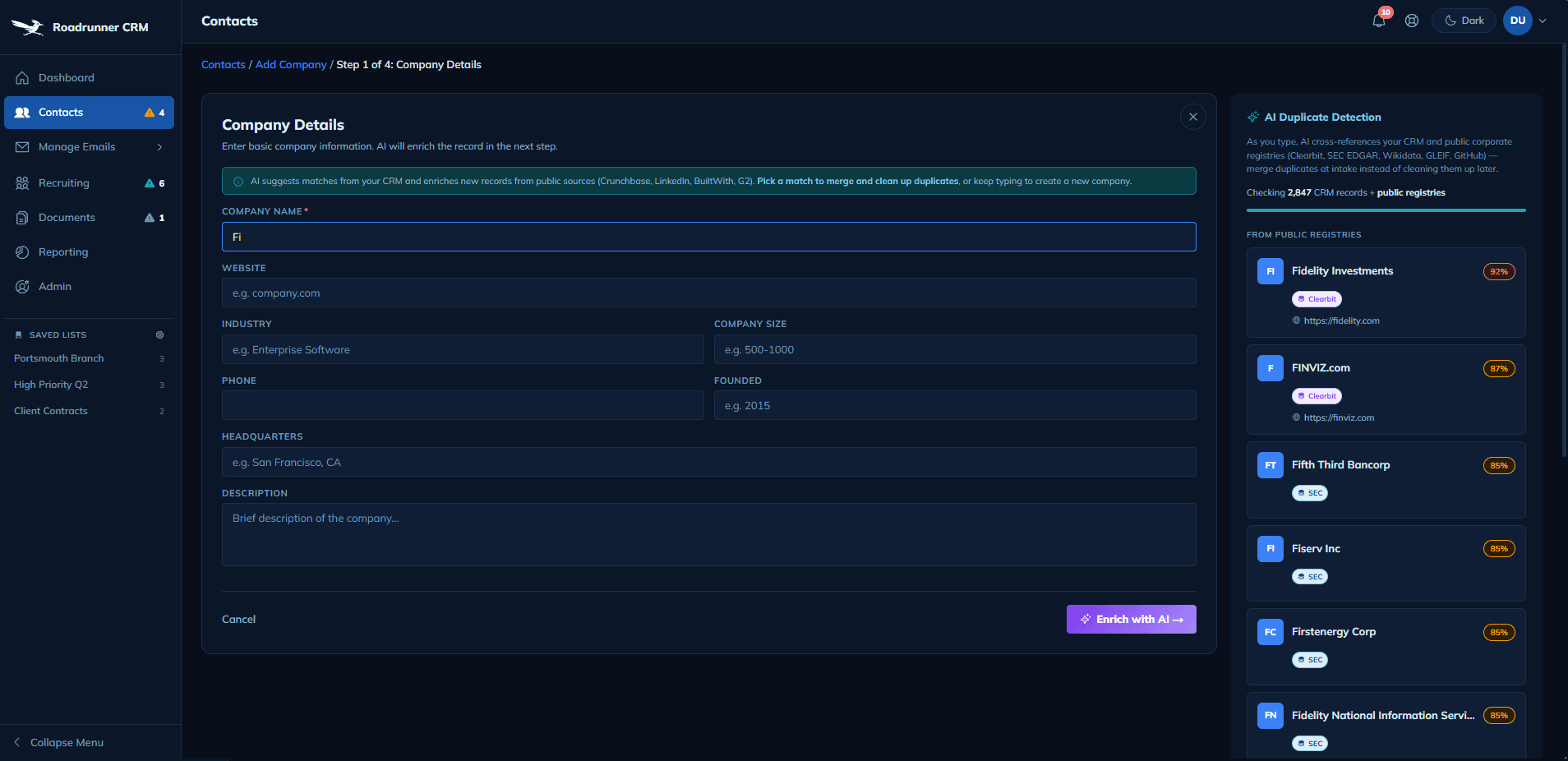
Flip to dark mode

Settings → Appearance. Every Acme token re-resolves instantly. Zero component rewrites — the loop handles it.

About the session: the demo stores state in your browser so your session is yours alone. Nothing you create is sent anywhere, and a refresh keeps your work intact until you choose to reset.

DESIGN DECISIONS

Six decisions, each rooted in what users asked for across twelve years of enterprise CRMs and data grids.

DECISION 1

Kill the fake data pool. Rebuild every AI path against eleven real public sources.

FINDING

The first build queried a 2,847-entry hardcoded name pool and labeled the result "Clearbit verified." The attribution was a string constant, not an API call.

INSIGHT

This wasn't a data bug, it was a trust bug. Every AI claim has to be inspectable or the demo dies on the first real name.

DESIGN

Server-side fan-out across eleven free public providers, including SEC EDGAR, OpenCorporates, Companies House, GLEIF, Wikidata, GitHub, Hunter, SAM.gov, ORCID, and Gravatar. Provider badges render on every suggested field, and any claim can be traced in one click.

DECISION 2

Column pinning — persisted, always visible.

FINDING

Wide data grids ran through every enterprise role I held, with AG Grid powering the underwriting dashboard at General Star and the staffing CRM at Madison Resources. The recruiters, underwriters, and analysts who lived in those grids all asked for column pinning by name, expecting the freeze-pane behavior Excel has had for thirty years.

INSIGHT

Pinning is a power feature users look for by name, so it has to live in plain sight rather than behind a hover state they have to discover.

DESIGN

Pin buttons always visible in the Columns dropdown. State persists across refresh via Zustand persist middleware. Left and right edges both supported.

DECISION 3

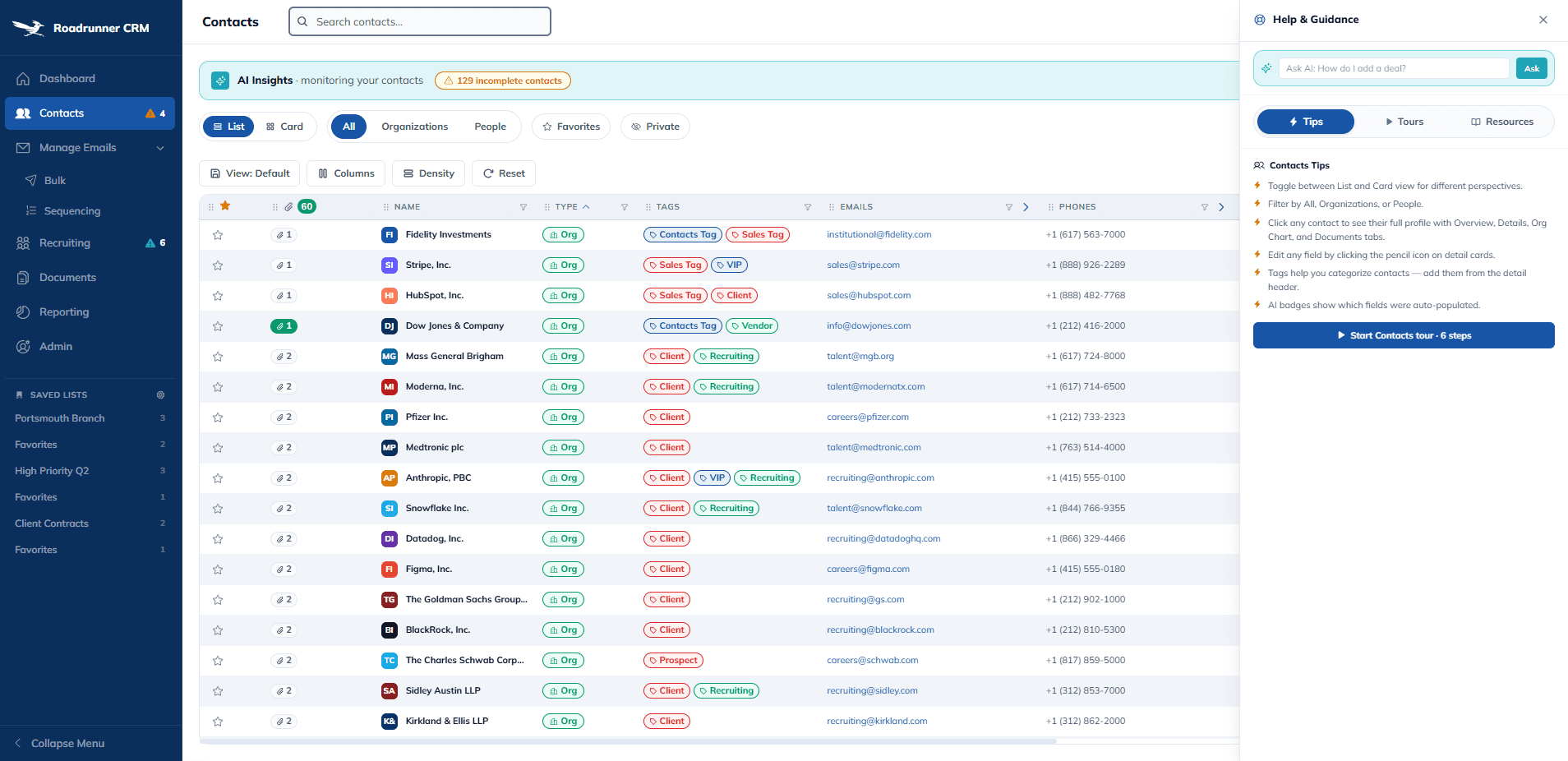
Tabbed help panel.

FINDING

Across every CRM I shipped, users asked for help they could reach the moment they were stuck, in any module, without hunting through a long list of walkthroughs.

INSIGHT

Help is a discoverability problem. A long scroll in a fixed-height panel hides the tours users actually need, and a count badge without units is decoration, not information.

DESIGN

Pill-segmented Tips, Tours, and Resources tabs, matching the List/Card and All/Organizations/People pills elsewhere. The current-page tour is pinned at top as "Recommended for this page," with no count.

DECISION 4

Tours live in the help panel — always available, not a one-time install cutscene.

FINDING

Across every CRM I shipped, support tickets spiked in week three, not week one. Users needed the walkthrough long after the one-time tour most products fire on first login had already disappeared.

INSIGHT

Help is most useful when the user is already frustrated, not when they're fresh. Burning tours on install spends them on the moment users need them least.

DESIGN

Nine contextual tours live permanently in the help panel, reachable from any page, filtered to the current surface first. Every tour can be re-run any time. No cutscenes, no dismiss-forever, no buried "restart tutorial" setting. The help icon is the entry point; the tour is always behind it.

DECISION 5

Light and dark mode, defined at the token layer so every surface retints for free.

FINDING

Light and dark mode is the single most-requested feature across every CRM I've shipped — financial services, HR staffing, compensation analytics. Users ask for it in week one. It ships in year three because teams retrofit it component by component.

INSIGHT

Dark mode isn't a styling pass. It's a token problem. If colors are defined per-component, you retrofit forever. If colors are defined as semantic tokens (surface, text-primary, border) in an Acme-style system, dark mode is one theme swap away.

DESIGN

Every Acme color is a semantic token mapped to a light and a dark value. The theme switch in Settings flips a root-level data attribute; every surface in every module retints instantly. No per-component work, no missed states. Shipped on day one, not year three.

DECISION 6

Toast confirmations with Undo on every destructive action.

FINDING

Initial delete handlers fired silent success. Users re-clicked delete because they were unsure the first click had registered.

INSIGHT

Silent success is disorienting. Gmail, Slack, and Figma anchor destructive actions on toast-with-Undo because reversibility reduces the fear tax on irreversible controls.

DESIGN

Four-severity toast system. Snapshot-and-restore Undo on every contact, deal, and candidate delete. Caught the missed contact-delete case when I asked, "If I delete a contact will I see a toast?"

WHAT I DELIVER TO ENGINEERING

Because the loop closes, I hand engineering deliverables they can consume directly instead of specs to translate.

A senior designer who has closed the design-to-code loop doesn't move stories from "in design" to "in dev." They move them from "in design" to "merged," because the artifacts engineering receives are already the ones they would build. That is the difference between one sprint and three.

The loop that finally closed
FIGMAVariables · componentsvia Figma MCPACMETOKENSone sourceCODETailwind CSS varsvia Claude CodeREAD · WRITEREAD · WRITE
One token. Rendered in Figma. Rendered in code. The token moves between both surfaces in real time — no handoff, no drift, no translation.

WITHOUT THE LOOP

What engineering gets today on most projects

  • Figma file with redlines to measure

  • PNG exports of states

  • Hex codes copy-pasted into CSS

  • Slack threads clarifying what a component means

  • Design drift discovered three sprints later

  • QA tickets retrofitting accessibility

  • Coordination meetings to align tokens

WITH THE LOOP

What engineering gets from me

  • Running token library — install and import

  • Live React components next to Figma frames

  • Figma-to-code prop mapping, one page per component

  • Validation rules authored on the design side

  • Accessibility baked into the system

  • AI-generated first drafts with judgment applied

  • One master doc, not thirty Slack threads

DELIVERABLE 01

A running design system engineering installs

Acme is a working token library. Figma variables and Tailwind CSS custom properties wired to the same source of truth. Engineering installs, imports, and ships.

DELIVERABLE 02

Live component references, not static specs

Every component lives in both Figma and a running React surface. Engineers click from the handoff to the rendered component with exact props and states.

DELIVERABLE 03

Grid pattern library from 12 years of CRMs

The grid toolbar — saved views, pinning, density, zebra, sticky actions, per-column filters — shipped as one reusable SharedDataGrid. One component to maintain, eight grids to use it.

DELIVERABLE 04

Tokens that survive refactors

Because tokens are defined once and referenced in both surfaces, engineering can rename, restructure, or reorganize without a coordination meeting. Figma updates when tokens do.

DELIVERABLE 05

Working prototypes instead of redlines

When I propose a pattern, I can ship a working prop-typed React component alongside the Figma frame. Engineering reviews behavior and props, not pixel measurements.

DELIVERABLE 06

Figma-to-code mapping documents

One page per component mapping Figma props to React props and CSS variables. No guessing, no "what does size=lg mean in the real file." Engineering reads, writes glue, ships.

DELIVERABLE 07

AI-assisted first drafts — with judgment applied

For rare patterns, I generate a first-draft React component with Claude Code and hand it to engineering with naming cleaned up, states verified, accessibility checked, tokens wired.

DELIVERABLE 08

Validation rules as design, not copy

Intake forms ship with required fields, format checks, error messages, and disabled states defined as props. Engineering implements the glue; rules live where the form lives.

DELIVERABLE 09

A running design system, not a style guide

Color contrast, focus states, keyboard navigation, and screen-reader labels are baked into Acme components. Use the button, get the a11y. No retroactive QA tickets.

DELIVERABLE 10

One artifact, not thirty Slack threads

The Acme master document — foundations, components, tokens, patterns, Figma-to-code mapping, grid library, validation, accessibility — in one navigable reference. Engineering bookmarks one URL.

OUTCOMES

A live working product, open for anyone to try.

3

3

Days to Acme
vs. weeks prior

Days to Acme
vs. weeks prior

5

5

Days to v1
empty repo → live

Days to v1
empty repo → live

8

8

Modules live
one domain

Modules live
one domain

11

11

Public providers
replacing fake data

Public providers
replacing fake data

13

13

Polish decisions
each with precedent

Polish decisions
each with precedent

$0

$0

Infra cost
hosting, SSL, domain

Infra cost
hosting, SSL, domain

The Loop Held

Figma tokens and Tailwind variables resolved to the same values. Zero handoff artifacts were written during the build.

Every AI claim is inspectable

Provider badges render next to every suggested field. Any claim can be traced to a real public source in one click.

Polish was disciplined

13 UX decisions shipped in one day. Average rationale: two sentences per decision. No feature creep.

Real AI, not a Figma prototype

The AI fires against real APIs. Custom subdomain, open-source repo. Anyone can click through and try to break it.

LIVE NOW

Roadrunner CRM — interactive portfolio demo

Ten free modules. Eleven free public data providers wired live. Sample HR staffing data seeded so the first click already has something to do. Every visitor gets a private browser-local sandbox, so you can explore freely without affecting anyone else.

roadrunner-crm.paulwentzellux.com

What I'd do differently

Wiring the real providers from day one, instead of letting the fake pool ship first, would have saved a rebuild that was instructive but expensive. Validation belonged on every intake surface before the first AI feature, not after it. The Postgres backend should have shipped alongside v1 rather than letting "browser-local only" carry the story for a week; the sandbox framing was convenient for a portfolio sprint and wrong for a CRM. On tours, walking through the app as a new user would have written the first one better than starting mid-flow did, and saved four rewrites. State-management refactors taught the hardest lesson: one pass at making column reorder, sort, filters, and saved views survive a refresh shipped a TanStack state refactor that caused an infinite render loop, eight commits and two reverts before it rolled back to a known-good baseline. The rule that came out of it costs nothing in retrospect: visual-only edits are safe to batch and ship, but state-engine changes go in one isolated commit with a browser-verified diff before git push. The pattern that held best was pairing every Claude-generated decision with a cited precedent from my career. The one to drop was trusting first-pass toast, tour, and state wiring to be complete; all three missed cases that only surfaced by running the flow cold.

COPYRIGHT © 2026 | Paul Wentzell UX